Compare. Analyze. Practice. Better lap times. Better consistency.
Built for iRacing drivers. Compare your lap with a reference, understand the differences through telemetry and 2D/3D replay, then practise with live voice and braking cues.
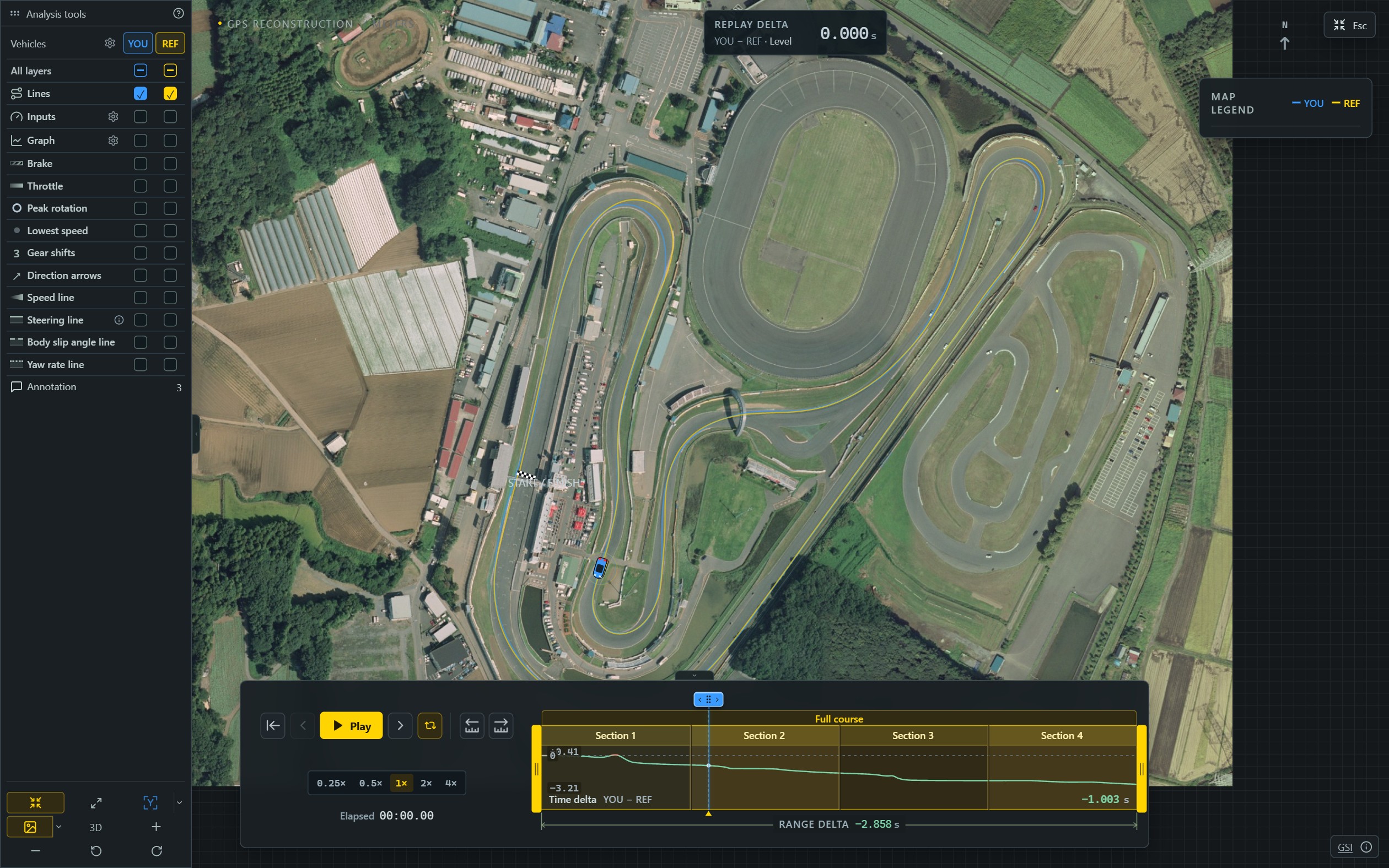
Import your iRacing laps and follow the car around the circuit. Member users can replay in 2D, add annotations to record driving points, and export a 2D video to revisit their practice.
Included with Member
Data import · 2D Replay · Annotations · 2D video export · Current replay cached locally
2D Replay · Original orthophoto · Imagery processed by DZ replay · Source: GSI
GO DEEPER WITH PRO
From 3D review to live practice.
Explore your iRacing telemetry with advanced analysis, 3D Replay, Live and voice cues. Use quick 3D export or create a video with clips, captions and camera moves in the video editor.
PRO
A closer look at every corner.
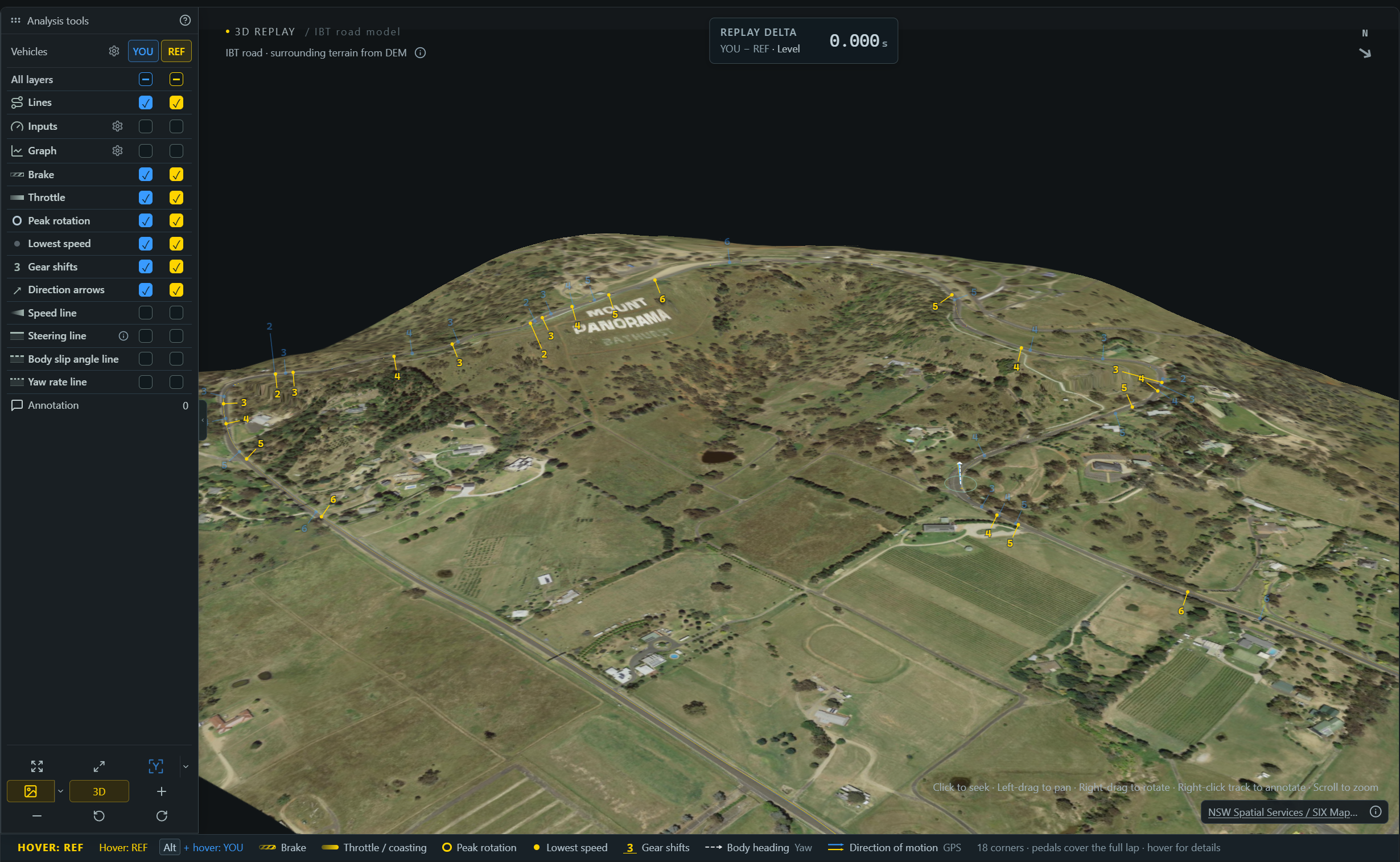
Bring your lap and a reference lap into the same 3D view. Use orthophoto imagery and terrain to study the circuit’s elevation changes, alongside your lines, braking and gear changes.
Export your replay as a video and keep the moments worth watching again.
Advanced Analysis
Connect racing lines with telemetry to examine input differences through a selected section.
PRO
Live cues. More consistent practice.
Compare your driving with REF in real time, and bring the annotations from your review into iRacing. Saved notes and braking tones remind you of the points you want to practise.
Voice callouts · Pro
Member includes annotations. Pro adds voice playback of your saved cues at track positions during live driving.
EXPLORE DZ REPLAY
Explore the details of every lap.
Swipe through the features. Open any screenshot for a closer look.
PRO
See the circuit in three dimensions.
Explore Mount Panorama with orthophoto imagery and terrain. Follow the racing lines, braking points and gear changes through the climb and descent.
PRO
Throttle and brake, on your racing line.
See where each driver brakes, releases the pedal and returns to the throttle. Compare those inputs at the same part of the circuit.
PRO
See how quickly the car rotates.
The yaw rate line shows how quickly body heading changes. Compare the build-up and release of rotation through a corner.
PRO
Read your steering through the corner.
The steering line maps steering-wheel angle along the lap. Compare turn-in, steering corrections and how you unwind the wheel.
MEMBER
Start both cars from any point.
Choose a point within the replay range to align MAIN and REF at the same track progress, then play them together. Each follows its own recorded timing, so the gap develops from your chosen start.
PRO
IBT brings body motion into 3D.
When the IBT contains the required channels, replay recorded pitch, roll and suspension movement, alongside a road shaped by recorded altitude.
2D · MEMBER / 3D · PRO
Turn your review into a video.
Preview framing and telemetry before export. Member includes 2D video export; Pro also supports 3D video export.
PRO
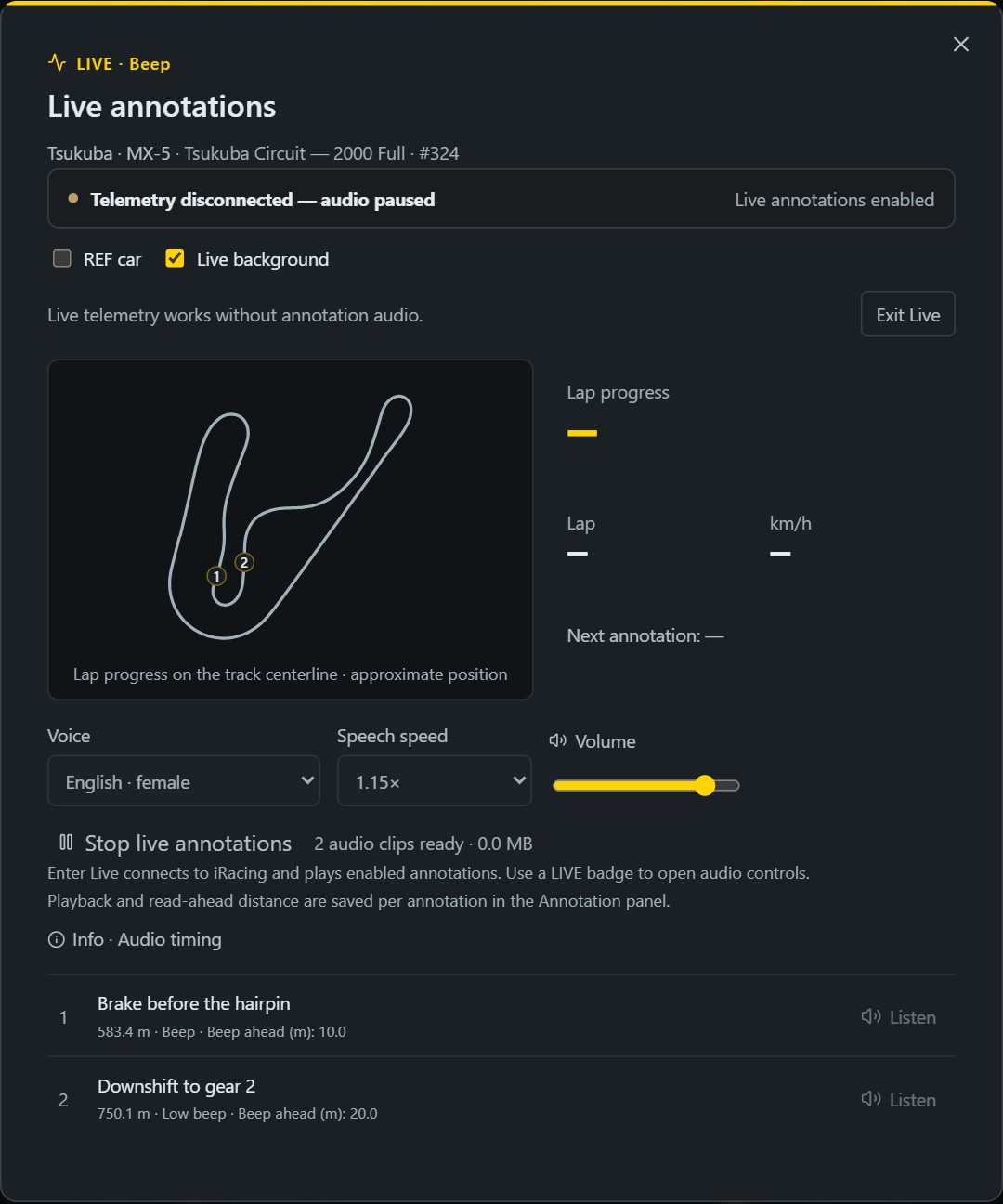
Bring your notes into Live practice.
Compare with your reference while driving. Enable saved notes and braking cues to practise the driving points from your review.
Live workspace shown waiting for iRacing telemetry.
CLOSED BETA
Join the next group of testers.
We’re planning two months of Closed Beta testing, open by invitation, to refine analysis, replay and live practice with drivers. Leave your email and we’ll invite testers in batches.
01Leave your email to request an invitation
02Wait for an invitation from the team
03Install the app and sign in with the invited email
Joining is free and does not create an account or subscription. Invited users can keep signing in; paid upgrades remain available.
MEMBER / PRO
Two tiers after Beta.
After Beta, DZ replay will offer Member and Pro. Member covers 2D replay, annotations and 2D video export; Pro adds advanced analysis, 3D replay and live practice.
Features
MemberReplay and annotations
ProAdvanced analysis and live practice
Data import
Included
Included
2D Replay
Included
Included
Annotations
Included
Included
Quick video export · 2D
Included
Included
Current replay cached locally
Included
Included
Advanced Analysis
—Not included
Included
3D Replay
—Not included
Included
Live
—Not included
Included
Voice callouts
—Not included
Included
Quick video export · 3D
—Not included
Included
Video editor
—Not included
Included
During Beta, your account’s assigned access and expiry apply. Invited users can still upgrade to Pro in the app’s Settings.
BEFORE YOU START
Before you start
Who operates DZ replay?
DZ replay is a brand of Velyra LLC, a California limited liability company. Velyra LLC operates the DZ replay software and website.
Which tiers will be available after Beta?
After Beta, DZ replay will offer two tiers: Member for basic replay and annotations, and Pro for advanced analysis, 3D replay and live practice. The comparison above shows what each tier includes.
What can Member users do?
Member includes data import, 2D Replay, annotations, 2D video export and a local cache of the current replay. You can add and use annotations; voice playback requires Pro.
What does Pro include?
Pro includes everything in Member, plus advanced Analysis, 3D Replay, Live, voice callouts and 3D video export.
What does P95 < 3 cm mean for braking cues?
It describes the 95th percentile of absolute cue position error in our local tests. Two separate verification runs measured 0.38 cm and 2.10 cm, using simulated motion with real audio output after session calibration. This measures cue timing along the track, rather than map accuracy. Real driving and headphone acoustic latency still need separate validation.
How can I get started?
Sign up for a closed beta invitation with your email. We review applications and invite testers in small batches during our planned two-month Closed Beta. After receiving an invitation, install the Windows app and sign in with the same email. Existing invited users can keep using the app.
Can I start using the app as soon as I sign up?
You’ll need an invitation before signing in. Signing up does not create an account or start a subscription. We’ll email you when your beta invitation is ready.
What happens to existing beta accounts and subscriptions?
Existing invited accounts keep their assigned Pro or Pro Beta access and expiry. Paid subscriptions and in-app upgrades remain available. Check Settings & account for your current access.